Showing posts with label install. Show all posts
Showing posts with label install. Show all posts
Tuesday, July 19, 2016
Install Android Applications On Windows Phone How to
If you are a Windows phone user but fancies android applications and would like to have android applications installed on your Windows phone, the chance is, if you are having one of the Windows phones listed below; you can have android applications downloaded and installed on your Windows phone directly from the Play Store.
The list of currently supported Windows Lumia phones that can install android applications include the followings;
1- Note that you are doing it at your own risk because I won’t be held responsible if anything happen to your device.
2- Do not disconnect the device while an apk is installing.
3- Do not reboot while your phone has Developer Mode Activated.
Now, you may proceed installing android applications on your Windows phone following the guides highlighted below:
Step 1- Download APKtoWind10 from here. APKtoWind10 is a Windows PC program designed for managing Windows phone applications.
Step 2- APKtoWind10 is compressed in a compressed file. Extract it in using WinRAR, WinZIP or 7zip. Once successfully extracted, install it on your PC and then, Lunch the program.
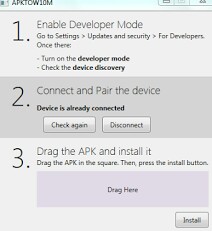
Step 3- Drag your Android apk file you wish to install on the PC inside the step 3 box and hit the install button.
You may download android applications from Mobomarket.
If you have anymore questions, use the comment box below
The list of currently supported Windows Lumia phones that can install android applications include the followings;
•Nokia Lumia 920
•Nokia Lumia 925
•Nokia Lumia 929 (icon)
•Nokia Lumia 830
•Nokia Lumia 930
•Nokia Lumia 1520
•Nokia Lumia 635 (1GB RAM variant)
•Nokia Lumia 730
•Nokia Lumia 820
•Nokia Lumia 435
•Nokia Lumia 928
INSTALLING ANDROID APPLICATIONS ON WINDOWS LUMIA PHONE
The process for installing Android apps on your Windows phone is simple however, you have to note these points before you proceed;1- Note that you are doing it at your own risk because I won’t be held responsible if anything happen to your device.
2- Do not disconnect the device while an apk is installing.
3- Do not reboot while your phone has Developer Mode Activated.
Now, you may proceed installing android applications on your Windows phone following the guides highlighted below:
Step 1- Download APKtoWind10 from here. APKtoWind10 is a Windows PC program designed for managing Windows phone applications.
Step 2- APKtoWind10 is compressed in a compressed file. Extract it in using WinRAR, WinZIP or 7zip. Once successfully extracted, install it on your PC and then, Lunch the program.
Step 3- Drag your Android apk file you wish to install on the PC inside the step 3 box and hit the install button.
You may download android applications from Mobomarket.
Credit goes to SDRdaniel, original developer.
If you have anymore questions, use the comment box below

Sunday, July 17, 2016
Install Android OS On your PC Just As you Install Windows Remix Android OS
Starting from the big-names in the PC OEM manufacturers to the little-known-about manufacturers in the industry, we have seen PCs made with android OS pre-installed. The most recent of them common in Nigeria is the Lenovo N-Series products. Now, Remix OS now make it possible for you to install fully operational Android OS on your PCs. Be it Mac, Windows or Linus machine, you can now install Android OS completely on the PC or, on a separate partition still on the same PC.
This recent development is made possible by Jide Technologies. Remix OS is now publicly available starting January this year, 2016.
Already anticipating to have this wonderful OS installed on your PC? Wait a minute! Lets see the preview of what the Remix OS looks like.
As earlier mentioned, Remix OS is built from source on the Android OS. Unlike the previous Android emulators that work on both Windows and Mac, Remix OS is a complete Android OS on its own and can be installed similar to the way your Windows or Mac OS is being installed.
Be it a Windows PC or MAC, Remix OS runs on both. The idea of the Remix OS is to bring the complete Android OS experience onto your PC. Featuring the native multitasking operations of other OSs, you can open multiple apps at the same time and use them simultaneously. You can maximize, minimize and resize windows -all these, to mention a few.
In the Remix OS, the notifications panel of the native android device has received a makeover to take advantage of larger computer screens. The OS is designed not only for keyboard and mouse users, but also for those who have a touchscreen device. Jide Technology also claims that Remix OS has the most advanced Android file manager. You can launch Google Play Store and download apps just the way you do on any android devices.
One concern that users have before installing Remix OS is software updates. Meanwhile, this should not be a problem since the OS has an OTA system update implemented to make installing the latest update easy.
If you are interested in installing Remix OS on your Windows PC, computer, laptop, iMac or Macbook, you may check our twitter tag at: #RemixAndroidPC or here: Remix OS, Android PC Updates.
Have you installed Remix OS before? Lets here from you! Give us feedback in the comment section below.
 |
| Remix OS | ShoutAmLoud |
This recent development is made possible by Jide Technologies. Remix OS is now publicly available starting January this year, 2016.
Already anticipating to have this wonderful OS installed on your PC? Wait a minute! Lets see the preview of what the Remix OS looks like.
As earlier mentioned, Remix OS is built from source on the Android OS. Unlike the previous Android emulators that work on both Windows and Mac, Remix OS is a complete Android OS on its own and can be installed similar to the way your Windows or Mac OS is being installed.
Be it a Windows PC or MAC, Remix OS runs on both. The idea of the Remix OS is to bring the complete Android OS experience onto your PC. Featuring the native multitasking operations of other OSs, you can open multiple apps at the same time and use them simultaneously. You can maximize, minimize and resize windows -all these, to mention a few.
 |
| Remix OS Desktop View | ShoutAmLOud |
In the Remix OS, the notifications panel of the native android device has received a makeover to take advantage of larger computer screens. The OS is designed not only for keyboard and mouse users, but also for those who have a touchscreen device. Jide Technology also claims that Remix OS has the most advanced Android file manager. You can launch Google Play Store and download apps just the way you do on any android devices.
 |
| Remix OS Notification Area | ShoutAmLoud |
One concern that users have before installing Remix OS is software updates. Meanwhile, this should not be a problem since the OS has an OTA system update implemented to make installing the latest update easy.
If you are interested in installing Remix OS on your Windows PC, computer, laptop, iMac or Macbook, you may check our twitter tag at: #RemixAndroidPC or here: Remix OS, Android PC Updates.
Have you installed Remix OS before? Lets here from you! Give us feedback in the comment section below.
Subscribe to:
Posts (Atom)